Sunday, 16 December 2012

SSD, GPT, EFI, TLA, OMG!

I finally bought an SSD, so I took the drive change as an excuse to try out some other nifty new technologies as well: UEFI and GPT. Getting them to work (along with a dual-boot operating systems - Gentoo + Windows 7) wasn't trivial so I'll describe what was required to get it all humming nicely.

The hardware part was easy. The laptop I have came with a 1TB 5.4k extra-slow hard drive plugged into it's only SATA-3.0 port, but that's not a problem. There's another SATA-2.0 port, dedicated to a DVD drive - why would anyone need that? I've replaced the main drive with a fast Intel SSD (450MBps write, 500MBps read, 22.5K IOPS - seriously, they've become so cheap that if you're not using one you must be some kind of a masochist that likes to stare blankly at the screen waiting for hard drive LEDs to blink), ordered a "Hard Driver Caddy" off eBay ($9 including postage, although it took 24 days to arrive from Hong Kong) and started system installation.

HDD and SSD on an open laptop

Non-chronologically, but sticking to the hardware topic: the optical drive replacement caddy comes in three different sizes (for slot drives/slim 9.5mm/standard 12.7mm) and that's pretty much the only thing you have to check before you order one. Connectors and even the masking plastic bits are standardised, so replacement operation is painless. A caddy itself weights about 35g (as much as a small candy bar), so your laptop will end a bit leaner than before.

DVD and an HDD in the caddy:
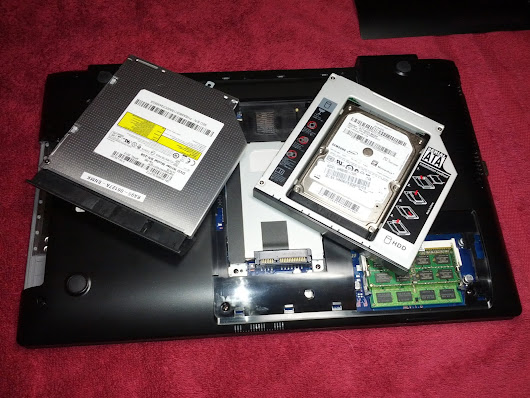
DVD and HDD in a replacement caddy

You'll want to remove the optical drive while it's ejected, as the release mechanism is electrical, and one of two hooks holding the bezel is only accessible when the drive is opened. I used a flat screwdriver to unhook it, but be careful, as the mask is quite flimsy and might break. Only a cosmetic problem, but still. Showing the hooks:

That's pretty much everything that's needed from the hardware side - now to the software. I was following a Superuser post Make UEFI, GPT, Bootloader, SSD, USB, Linux and Windows work together, which describes the dual boo installation procedure quite well. My first problem was that I couldn't get a UEFI boot to work from a DVD (when I still had it). Went for the easiest solution with Ubuntu Live USB that managed to start in the UEFI mode just fine.

There are quite a few "gotchas" here: you can't install a UEFI system if you're not already booted into UEFI mode (check dmesg output for EFI messages). The starting payload needs to be 64 bit and reside on a FAT32 partition on a GPT disk (oversimplifying a bit, but those are the requirements if you want to dual-boot with Windows). A side-note for inquiring minds: you'll also need a legal copy of Windows 7/8, as the pirate bootloaders require booting in BIOS mode. Oh, and your SATA controller needs to be set to AHCI mode, because otherwise TRIM commands won't reach your SSD drive and it will get slower and slower as it fills with unneeded (deleted, but not trimmed) data.

Once I had Ubuntu started, I proceeded with a mostly standard Gentoo installation procedure. Make sure you do your GPT partitioning properly (see the Superuser post, although the 100MB for EFI boot partition might be too much - I have 16MB used on it and that's unlikely to change) and remember to mount the "extra" partition in /boot/efi before you install Grub2. Additional kernel options needed are listed on Gentoo Wiki, Grub2 installation procedure for UEFI is documented there as well. Make sure that your Linux partitions are ext4 and have the discard option enabled.

All of this resulted in my machine starting - from pressing the power button to logging onto Xfce desktop - in 13 seconds. Now it was time to break it by getting Windows installed. Again, the main hurdle proved to be starting the damn installer in UEFI mode (and you won't find out in which mode it runs until you try to install to a GPT disk and it refuses to continue because of unspecified errors). Finally I got it to work by using the USB I had created for Ubuntu, replacing all of the files on the drive with Windows Installation DVD contents and extracting the Windows bootloader. That was the convoluted part, because a "normal" Windows USB key will only start in BIOS mode.

  • Using 7zip, open file sources/install.wim from the Windows installation DVD and extract \1\Windows\Boot\EFI\bootmgfw.efi from it.
  • On your bootable USB, copy the folder efi/microsoft/boot to efi/boot.
  • Now take the file you extracted and place it in efi/boot as bootx64.efi.

This gave me an USB key that starts Windows installer in UEFI mode. You might want to disconnect the second drive (or just disable it) for the installation, as sometimes Windows decides to put it's startup partition on the second drive.

Windows installation done, I went back to Ubuntu Live USB and restored Grub2. Last catch with the whole process is that, due to some bug, it won't auto-detect Windows, so you need an entry in /etc/grub.d/40_custom file:

menuentry "Windows 7 UEFI/GPT" {
 insmod part_gpt
 insmod search_fs_uuid
 insmod chain
 search --fs-uuid --no-floppy --set=root 6387-1BA8
 chainloader ($root)/EFI/Microsoft/Boot/bootmgfw.efi
}

The 6387-1BA8 identifier is the partitions UUID, you can easily find it by doing ls -l /dev/disk/by-uuid/.

Dual-booting is usually much more trouble than it's worth, but I did enjoy getting this all to work together. Still, probably not a thing for faint of heart ;-) I also have to admit that after two weeks I no longer notice how quick boot and application start-up are (Visual Studio 2012 takes less than a second to launch with a medium size solution, it's too fast to practically measure), it's just that every non-SSD computer feels glacially slow.

In summary: why are you still wasting your time using a hard drive instead of an SSD? Replace your optical drive with a large HDD for data and put your operating system and programs on a fast SSD. The hardware upgrade is really straightforward to do!

Sunday, 30 September 2012

Handling native API in a managed application

Although Windows 8 and .NET 4.5 have already been released, bringing WinRT with them and promising the end of P/Invoke magic, there's still a lot of time left until programmers can really depend on that. For now, the most widely available way to interact with the underlying operating system from a C# application, when the framework doesn't suffice, remains P/Invoking the Win32 API. In this post I describe my attempt to wrap an interesting part of that API for managed use, pointing out several possible pitfalls.

rusted gears

Lets start with a disclaimer: almost everything you need from your .NET application is doable in clean, managed C# (or VisualBasic or F#). There's usually no need to descend into P/Invoke realms, so please consider again if you really have to break from the safe (and predictable) world of the Framework.

Now take a look at one of the use cases where the Framework does not deliver necessary tooling: I have an application starting several children processes, which may in turn start other processes as well, over which I have no control. But I still need to turn the whole application off, even when one of the grandchild processes breaks in a bad way and stops responding. (If this is really your problem, then take a look at KillUtil.cs from CruiseControl.NET, as this way ultimately what I had to do.)

There is a very nice mechanism for managing child processes in Windows, called Job Objects. I found several partial attempts of wrapping it into a managed API, but nothing really that fitted my purpose. An entry point for grouping processes into jobs is the CreateJobObject function. This is a typical Win32 API call, requiring a structure and a string as parameters. Also, meaning of the parameters might change depending on their values. Not really programmer-friendly. There are a couple of articles on how the native types map into .NET constructs, but it's usually fastest to take a look at PInvoke.net and write your code based on samples there. Keep in mind that it's a wiki and examples will often contain errors.

What kind of errors? For one, they might not consider 32/64 bit compatibility. If it's important to you then be sure to compile your application in both versions - if your P/Invoke signatures aren't proper you'll see some ugly heap corruption exceptions. Other thing often missing from the samples is error checking. Native functions do not throw exceptions, they return status codes and update the global error status, in a couple of different ways. Checking how a particular function communicates failure is probably the most tricky part of wrapping. For that particular method I ended up with the following signature:

[DllImport("kernel32", SetLastError = true, CharSet = CharSet.Auto)]
private static extern IntPtr CreateJobObject(IntPtr lpJobAttributes, string lpName);

Modifiers static extern are required by P/Invoke mechanism, private is a good practice - calling those methods requires a bit of special handling on the managed side as well. You might also noticed that I omitted the .dll part of the library signature - this doesn't matter on Windows, but Mono will substitute a suitable extension based on the operating system it's running on. For the error reporting to work, it's critical that the status is checked as soon as the method returns. Thus the full call is as follows:

IntPtr result = CreateJobObject(IntPtr.Zero, null);
if (result == IntPtr.Zero)
    throw new Win32Exception();

On failure, this will read the last reported error status and throw a descriptive exception.

Every class holding unmanaged resources should be IDisposable and also include proper cleanup in it's finalizer. Since I'm only storing an IntPtr here I'll skip the finalizer, because I might not want for the job group to be closed in some scenarios. In general that's a bad pattern, it would be better to have a parameter controlling the cleanup instead of "forgetting" the Dispose() call on purpose.

There's quite a lot of tedious set-up code involved in job group control that I won't be discussing in detail (it's at the end of this post if you're interested), but there are a couple of tricks I'd like to point out. First, and pointed out multiple times in P/Invoke documentation (yet still missing from some samples) is the [StructLayout (LayoutKind.Sequential)] attribute, instructing the runtime to lay out your structures in memory exactly as they are in the file. Without that padding might be applied or even the members might get swapped because of memory access optimisation, which would break your native calls in ways difficult to diagnose (especially if the size of the structure would still match).

As I mentioned before, Win32 API calls often vary their parameters meaning based on their values, in some cases expecting differently sized structures. If this happens, information on the size of the structure is also required. Instead of manual counting, you can rely on Marshal.SizeOf (typeof (JobObjectExtendedLimitInformation)) to do this automatically.

Third tip is that native flags are best represented as enum values and OR'ed / XOR'ed as normal .NET enums:

[Flags]
private enum LimitFlags : ushort
{
    JobObjectLimitKillOnJobClose = 0x00002000
}

Wrapping unmanaged API often reveals other problems with it's usage. In this case, first problem was that Windows 7 uses Compatibility Mode for launching Visual Studio, which that wraps it and every program started by it in a job object. Since a job can't (at least not in Windows 7) belong to multiple groups, my new job group assignment would fail and the code would never work inside a debugger. As usual, StackOverflow proved to be helpful in diagnosing and solving this problem.

However, my use case is still not fulfilled: if I add my main process to the job group, it will be terminated as well when I close the group. If I don't, then a child process might spin off children of its own before it is added to the group. In native code, this would be handled by creating the child process as suspended and resuming it only after it has been added to the job object. Unfortunately for me, turns out that Process.Start performs a lot of additional set-up that would be much too time consuming to replicate. Thus I had to go back to the simple KillUtil approach.

I've covered a couple of most common problems with calling native methods from a managed application and presented some useful patterns that make working with them easier. The only part missing is the complete wrapper for the API in question:

Friday, 31 August 2012

Dynamic log level with log4net

Out of all the features of log4net, the most useful and the least known at the same time is the possibility for the logger to dynamically change the logging level based on future events. Yes, future! Nothing like a little clairvoyance to produce clean and usable log files.

log4net can buffer incoming events and, when an error occurs, write out the sequence of actions that lead to it - and if nothing wrong happens, then the excessive messages are dropped. The class that allows for that is BufferingForwardingAppender. It wraps around another log appender (e.g. file or console or smtp or database or eventlog or whatever else you would like log4net to write to) and uses an evaluator to decide when to flush buffered data. Let's have a look at a sample configuration (app.config file):

<?xml version="1.0" encoding="utf-8"?>
<configuration>
  <configSections>
    <section name="log4net" type="log4net.Config.Log4NetConfigurationSectionHandler, log4net" />
  </configSections>
  <log4net>
    <!-- see http://logging.apache.org/log4net/release/config-examples.html for more examples -->
    <appender name="ConsoleAppender" type="log4net.Appender.ConsoleAppender">
      <threshold value="WARN" />
      <layout type="log4net.Layout.PatternLayout">
        <conversionPattern value="%-4timestamp [%thread] %-5level %logger %ndc - %message%newline" />
      </layout>
    </appender>
    <!-- you should use a RollingFileAppender instead in most cases -->
    <appender name="FileAppender" type="log4net.Appender.FileAppender">
      <file value="my_application.log" />
      <!-- pattern is required or nothing will be logged -->
      <layout type="log4net.Layout.PatternLayout">
        <conversionPattern value="%-4timestamp [%thread] %-5level %logger %ndc - %message%newline" />
      </layout>
    </appender>
    <appender name="BufferingForwardingAppender" type="log4net.Appender.BufferingForwardingAppender" >
      <evaluator type="log4net.Core.LevelEvaluator">
        <threshold value="ERROR" />
      </evaluator>
      <bufferSize value="50" />
      <lossy value="true" />
      <appender-ref ref="FileAppender" />
    </appender>
    <!-- root is the main logger -->
    <root>
      <!-- default is INFO, this performs initial filtering -->
      <level value="DEBUG"/>
      <!-- messages are sent to every appender listed here -->
      <appender-ref ref="BufferingForwardingAppender"/>
      <appender-ref ref="ConsoleAppender" />
    </root>
  </log4net>
</configuration>

Now this is a wall of text. What is going on here?

  • configSections is a standard .NET configuration section declaration
  • then we declare a ConsoleAppender that will print everything of level WARN or above to console - you can configure a ColoredConsoleAppender instead to have prettier output
  • following that is a FileAppender, which simply outputs everything to a file
  • next one is the magical BufferingForwardingAppender, containing an evaluator that triggers for every message of level ERROR or above, a lossy buffer of size 50 (that means that when more messages are buffered, the first ones are being discarded) and a target appender that will receive messages when they are flushed
  • last element is the root logger, which is the default sink for all the messages - it contains referenced to our appenders and will feed messages to them

So far so good. log4net now needs to be instructed to parse this configuration - my preferred way is with an assembly attribute:

[assembly: log4net.Config.XmlConfigurator (Watch = true)]

You can specify a file path in this attribute if you don't want to store your configuration inside app.config. A simple way to create a logger is just

private static readonly log4net.ILog log = log4net.LogManager.GetLogger ( System.Reflection.MethodBase.GetCurrentMethod ().DeclaringType );

and we're good to go. Now all that remains is dumping some log messages into our log.

for (int i = 0; i < 1025; i++)
{
  log.DebugFormat("I'm just being chatty, {0}", i);
  if(i%2 ==0)
    log.InfoFormat("I'm just being informative, {0}", i);
  if(i%20 == 0)
    log.WarnFormat("This is a warning, {0}", i);
  if(i%512==0)
    log.ErrorFormat("Error! Error! {0}", i);
}

When you execute this sample code you will see every warning and error printed to console. Contents of my_application.log, however, will look differently: they will contain only errors and 50 messages that were logged before the error. Now that's much easier to debug, isn't it?

Please also take a look at how I include parameters in the logging calls: using the DebugFormat() form overloads means that the strings are not formatted until this is necessary - so if a log message is suppressed, no new string will be allocated and no ToString() will be called. This might not change your applications performance a lot, but it's a good practice that is worth following. And one last thing to remember: log4net, by default, does not do anything. In order to get any output, you need to explicitly request it - most likely through configuration.

Wednesday, 1 August 2012

NuGet proxy settings

This post is based on code present in NuGet 2.0.

NuGet reads web proxy settings from three distinct sources, in order:

  • configuration files
  • environment variables
  • current user's Internet Options

While the layout of IE's Connection Settings is probably familiar to you if you are behind a corporate firewall and require proxy configuration to access the Internet, first two options require a bit of explanation.

For configuration files, NuGet first considers .nuget\NuGet.config and then falls back to %APPDATA%\NuGet\NuGet.config. Relevant configuration entries are http_proxy, http_proxy.user and http_proxy.password. You can either edit them manually, by adding a line under <settings> node:

<add key="http_proxy" value="http://company-squid:3128" />

or you can add them from NuGet command line:

nuget.exe config -set http_proxy=http://company-squid:3128

If those variables aren't found in the configuration files, NuGet will fall back to checking standard environment variables for proxy configuration. By pure concidence, the variables have the same names as the configuration options ;-) . Names are not case-sensitive, but you might have to experiment a bit until you get NuGet to properly parse your settings if you have a space where it wouldn't expect one (e.g. in your user name).

Finally, if you are running NuGet in your user account, not using a service account (e.g. on a continuous build server), it will simply pick up whatever you have configured in the Control Panel as the system proxy server. All credentials configured there (including Active Directory single sign-on mechanism) should work without any work on your part.

Monday, 4 June 2012

Why aren't C# methods virtual by default?

Recently, during GeeCON 2012 conference, I had a very interesting conversation with Martin Skurla on differences between the .NET runtime and the Java Virtual Machine. One of the more surprising divergences is centred around the virtual keyword.

Virtual methods are one of the central mechanisms of polymorphic objects: they allow a descendant object to replace the implementation provided by the base class with it's own. In fact, they are so important that in Java all public methods are virtual by default. even though this does carry a small runtime overhead. The virtual method dispatch is usually implemented using a virtual method table, thus each call to such a method requires an additional memory read to fetch the code address - it cannot be inlined by the compiler. On the other hand, a non-virtual method can have it's address inlined in the calling code - or even can be inlined whole, as is the case with trivial methods such as most C# properties.

There are several ways of dealing with this overhead: HotSpot JVM starts the program execution in interpreted mode and does not compile the bytecode into machine code until it gathers some execution statistics - among those is information, for every method, if it's virtual dispatch has more than a single target. If not, then the method call does not need to hit the VTable. When additional classes are loaded, the JVM performs what is called a de-optimization, falling back to interpreted execution of the affected bytecode until it re-verifies the optimization assumptions. While technically complex, this is a very efficient approach. .NET takes a different approach, akin to the C++ philosophy: don't pay for it if you don't use it. Methods are non-virtual by default and the JIT performs the optimization and machine code compilation only once. Because virtual calls are much rarer, the overhead becomes negligible. Non-virtual dispatch is also crucial for the aforementioned special 'property' methods - if they weren't inlineable (and equivalent in performance to straight field access), they wouldn't be as useful. This somewhat simpler approach has also the benefit of allowing for full compilation - JVM need to leave some trampoline code between methods that will allow it to de-optimize them selectively, while .NET runtime, once it has generated the binaries for the invoked method, can replace (patch) the references to it with simple machine instructions.

I am not familiar with any part of ECMA specification that would prohibit the .NET runtime from performing the de-optimization step, thus not permitting the HotSpot approach to the issue (apart from the huge Oracle patent portfolio covering the whole area). What I do know is that since the first version of the C# language did not choose virtual to be the default, future versions will not change this behaviour - it would be a huge breaking change for the existing code. I've always assumed that the performance trade-off rationale was the reason for the difference in behaviour - and this was also what I explained to Martin. Mistakenly, as it turns out.

As Anders Hejlsberg, the lead C# architect, explains in one of his interviews from the begging of the .NET Framework, a virtual method is an important API entry point that does require proper consideration. From software versioning point of view, it is much safer to assume method hiding as the default behaviour, because it allows full substitution according to the Liskov principle: if the subclass is used instead of an instance of the base class, the code behaviour will be preserved. The programmer has to consciously design with the substitutability in mind, he has to choose to allow derived classes to plug into certain behaviours - and that prevents mistakes. C# is on it's fifth major release, Java - seventh, and each of those releases introduces new methods into some basic classes. Methods which, if your code has a derived class that already used the new methods name - constitute breaking changes (if you are using Java) or merely compilation warnings (on the .NET side). So yes, a good public API should definitely expose as many plug-in points as possible, and most methods in publicly extendable classes should be virtual - but C# designers did not want to force this additional responsibility upon each and every language user, leaving this up to a deliberate decision.

Tuesday, 1 May 2012

Tracking mobile visitors with Google Analytics

I've seen some strange approaches to tracking mobile visits using Google Analytics, which is quite surprising - especially considering that this is something that Analytics does out of the box. Granted, the Standard Reporting -> Audience -> Mobile page does not show much, apart from mobile operating system and resolution, but there's a very nice tool that allows any report to be filtered by a custom parameter.

I'm not talking about Profiles, which, although powerful, are only applied as data is gathered, and cannot be selectively enabled and disabled for existing statistics. Advanced segments are a very mighty, yet not well known tool. They can filter any existing report (e.g. Content, to see what pages should be the first to get a mobile-friendly layout). Most importantly - they can be mixed and matched, to show multiple facets of your site's traffic at once:

Visitors by browser

As today Google enabled custom reports and advanced segments sharing, you can just click my link to add Advanced segment - Mobile to your Google Analytics dashboard. If you would rather define it manually (and you should - as you'll probably want to define other advanced segments for your site), then proceed as follows:

  • Go to Standard Reporting -> Advanced Segments and click New Custom Segment
  • In the new form, set Name to Mobile, and parameters to Include, Mobile, Exactly matching, Yes
  • Press Save Segment and you're done.
Defining Advanced Segment for Mobile

To choose which segments are used for displaying the data, press Advanced Segments again, select and press Apply. All Visitors brings you back to an unfiltered view.

Choosing active segments

And finally, a screenshot of the Mobile segment in action:

Mobile visitors vs. total traffic

Tuesday, 24 April 2012

I want to live forever!

There is a concept of singularity in general relativity theory, describing a place where gravitational forces become infinite, and the rules of the universe no longer apply. This area is limited by the events horizon, from which no knowledge of the internal state of the singularity can escape. By analogy, Vernor Vinge in 1982 coined the term technical singularity to describe the moment in the history of technology when the rate of acceleration of future development becomes infinite from the point of view of a bystander. This is based on observation that all knowledge growth is self-propelling, and - as Ray Kurzweil argues - Moore's observation of exponential growth of computation capabilities extends both into the far past and the oncoming future.

Not surprisingly, such topic is a potent source of inspiration for science fiction writers, bringing forth numerous stories. Doctor Manhattan from Watchmen, Amber from Accelerando and Adam Zamoyski from Perfect Imperfection are just a few of my favourite characters, taking positions on the curve of progress that are well beyond human capabilities. However, the singularity seems now close enough that it no longer resides in the realm of pure fiction - well established futurologists place their bets as well, trying to proclaim the date of the breakthrough. Reading through the list of such predictions amassed by Ray Kurzweil, a curious pattern emerges: each of the prophets places the term within his own lifespan, hoping himself to experience the event.

Those bets may not be that far off: just from last year, I recall two large pharmaceutical companies starting clinical trials with yet another batch of medications promising to delay the aging process and to relegate it beyond the hundred years milestone. First journalist comments on the story also mentioned - with outrage - how this would necessitate another extension of the retirement age. Which is a bit ironic, considering the fact that initially the Old Age Pension introduced by Otto von Bismarck covered workers reaching 70 years of life, which was only a small percentage of the overall workforce at that time. Before you comment with dismay, consider that passing - or even approaching - the technical singularity means a true end to the scarcity economy. It's a world close to the one shown in Limes inferior, Crux or the books of Cory Doctorow: a real welfare state, where every citizen can be provided with almost anything he needs.

Interestingly, Terry Pratchett hid a gem of an idea of how such a society is born in his book Strata: once a dependable life-prolonging technique is available, anyone earning enough per year to elongate his life at least for the next year becomes effectively immortal. The most amazing - and brutal - events happen at the brink of this revolution, for that truly is the events horizon: beyond the extension threshold, people are on their way to become gods and live forever. Being left behind is one of the most scary things that I can imagine. And unlike the gravitational singularity, this one has a border that permits communication. One-way, mostly, as it's not possible for an ant to understand the giant, but that makes the division even more glaring.

Those that are able to partake in the transition will be, in a way, the last human generation. Oh, surely we will not stop to procreate, but the relation of power between the children and the parents will change dramatically: no longer are they raising a heir, an aid for their old days. As if they are a vampire from old tales - a child becomes a very expensive burden, that only the wealthiest can afford, and a competitor for limited resources. I did mention before that this will be a post-scarcity economy, but still some goods remain in limited supply. A Mona Lisa, for example.

And if you are lucky enough to be a member of the chosen caste, why wouldn't you desire something as unique? After all, your wealth will be unimaginable, with time unlimited for gathering the spoils, and only so few from your generation to share this gift of time. That's the real meaning of the last generation - for others will too, in future, arise to this plateau of eternal life. But being late to the party, most of them will never have the chance to amass such wealth and power.

I don't claim to know when will the breakthrough come. However, when it does - wouldn't it be terrible to miss it just by a few years? We already know some ways to extend ones life. If I can get ten, even five years more, my chances to participate in the singularity grow.
And so, I run.